
Measured, not promised
Performance
Every number on this page comes from real photos on an ordinary laptop (Apple M3, 16 GB), and the scripts that produced them are in the repository, so anyone can run them again. Below each chart is what it means for your prints, and at the end, the words behind the numbers.
Speed: a thousand photos in a blink
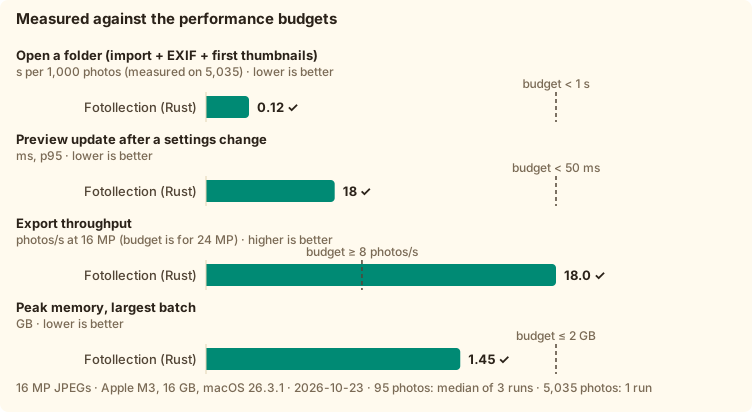
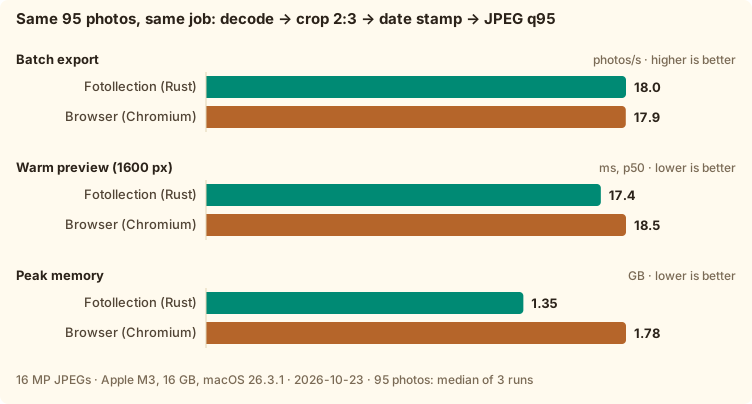
Opening a folder reads each photo's EXIF and its small embedded thumbnail, not the whole image: 1,000 photos take 0.12 seconds, eight times under the budget we set before writing the code. Changing a setting re-renders the preview in 17 ms, faster than a screen refreshes twice. Export runs at 18 photos per second at full 16 MP quality. Native Rust also beats a web browser doing the same job: the same speed for export, a faster preview, and a quarter less memory.
Memory: 5,035 photos, and it stays flat
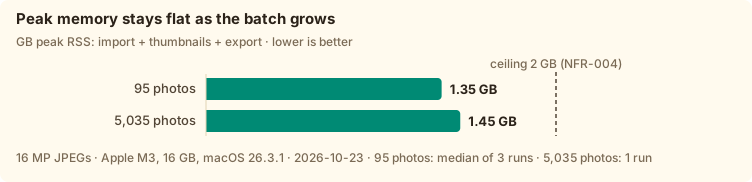
A trip can mean thousands of photos. Fotollection keeps only a few bytes per photo in memory, writes thumbnails to a disk cache and works on at most six full-size images at a time. With 53 times more photos, peak memory grows by 0.1 GB: 1.35 GB for 95 photos, 1.45 GB for 5,035, well under the 2 GB ceiling.
Print quality: the print looks like the photo
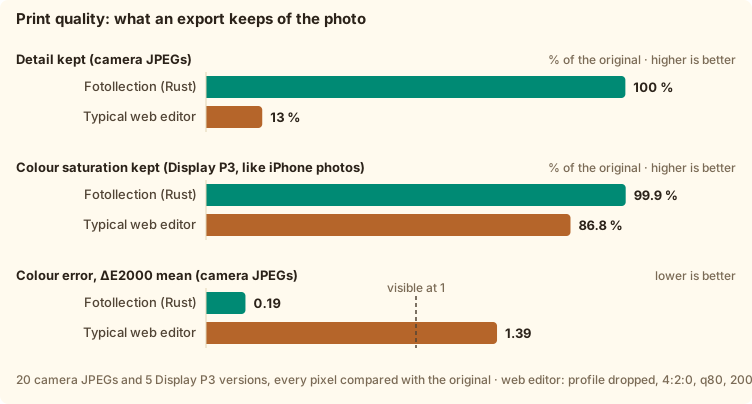
Prints made through a web editor often look flat. We measured why: the editor drops the colour profile (13 % of the saturation of iPhone photos lost), shrinks the photo to 2,000 px and lets the lab blow it up again (87 % of the fine detail lost), and saves at quality 80 with halved colour resolution. Fotollection keeps the profile, exports at full resolution in 4:4:4 at quality 95, and its colour error stays at 0.19, far below the 1 where an eye starts to notice.
Photos for Facebook and Instagram: light, and still the photo
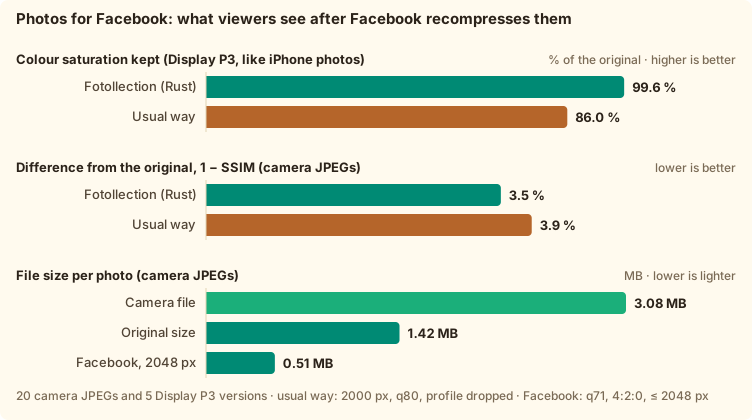
Facebook shrinks every photo to 2,048 px and recompresses it, and it ignores colour profiles. The Share export does that work properly first: the photo is converted to sRGB, resized with a high-quality filter, lightly sharpened and saved at a size Facebook does not touch again. After Facebook's own recompression, the result stays closer to the photo than the usual way, and iPhone-style Display P3 photos keep 99.6 % of their colour instead of 86 %. The Original size option keeps every pixel at half the file, with a colour error under 1.
Best-shot suggestions: checked against a person's choice
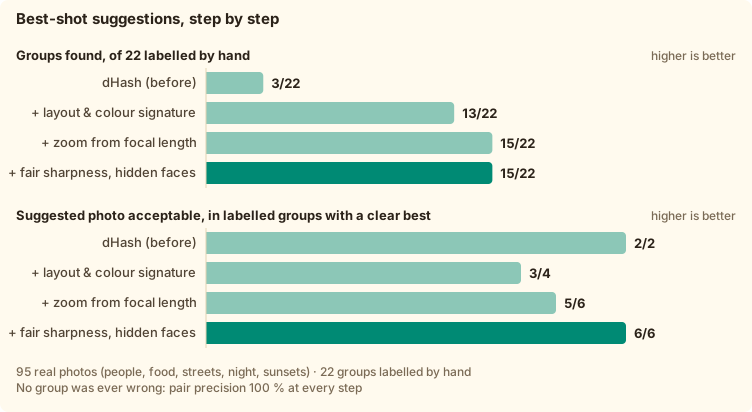
We sorted 95 real photos by hand into 22 moments, and picked the best photo where there was a clear one. Fotollection finds 15 of those moments without ever grouping two different ones, and its suggestion is acceptable in all six moments with a clear best. Each photo takes 17 ms to analyse, 28 ms when it has faces.
The words behind the numbers
Photo and print jargon, explained the way we would explain it to a friend.
What is ΔE (Delta E)?
ΔE measures how far apart two colours look to a human eye, computed in a colour space built to match how we see (CIELAB, with the 2000 formula). 0 means identical. Around 1 is the smallest difference a trained eye can spot side by side; 2 to 3 is visible to most people; above 5 the colours look different. Fotollection's print export averages 0.19.
What is SSIM?
SSIM, the structural similarity index, compares the shapes and textures of two images rather than single pixels, which is closer to how we notice blur or blocky compression. 1 means identical. Above about 0.98, most people cannot tell the two apart without zooming in.
How many colours can a JPEG hold?
A JPEG stores 8 bits for each of red, green and blue: 256 levels each, about 16.7 million colours. That is also what photo labs print from. Camera RAW files hold 12 to 14 bits and recent iPhones can save 10-bit HEIC, which helps when editing; for a finished print, a well-made 8-bit JPEG shows no steps between tones.
JPG or JPEG? And should I use PNG?
JPG and JPEG are the same format: old Windows only allowed three-letter extensions. PNG is lossless, so nothing is ever thrown away, but a photo saved as PNG is often three to five times larger, and most kiosks and labs expect JPEG. A JPEG at quality 95 with full colour resolution (4:4:4), as Fotollection exports for print, is indistinguishable from the original on paper.
What do 4:4:4 and 4:2:0 mean?
Our eyes see detail mostly in brightness, less in colour, so JPEG can store colour at lower resolution. 4:4:4 keeps full colour resolution; 4:2:0 keeps a quarter of it, which makes files smaller but softens coloured edges, such as red text or a blue sky behind leaves. Prints deserve 4:4:4; social media recompresses everything to 4:2:0 anyway.
sRGB, Display P3 and colour profiles
A colour profile tells software what the numbers in a file mean. sRGB is the classic range of colours used on the web. Display P3, used by iPhones and recent cameras, reaches about 25 % more colours, especially reds and greens. If a P3 photo loses its profile, its numbers are read as sRGB and it looks washed out: that is the 13 % saturation loss we measured. Fotollection keeps the profile for prints and converts properly to sRGB for social media.
What DPI does a print need?
DPI is how many pixels land on each inch of paper. At 300 DPI a print looks sharp even up close; 150 to 200 DPI is fine at arm's length. A 10 × 15 cm print at 300 DPI needs 1,800 × 1,200 pixels, so any phone or camera photo is enough; the size advice in the app tells you how large each photo can go.
Why do photos look worse on Facebook?
Facebook resizes every photo to at most 2,048 px, recompresses it at a lower quality with halved colour resolution, and drops colour profiles. A photo that arrives too large is resized twice, once by you and once by Facebook. Sending it already at 2,048 px, in sRGB and lightly sharpened, means Facebook only recompresses it once, and the colours are already right.
Run the measurements yourself
Everything is reproducible on your own photos. The scripts never upload or copy a photo; only numbers are kept. The full tables, with every run, are in RESULT.md.
bench/run.sh ~/Pictures/some-folder 3
uv run bench/quality/audit.py ~/Pictures/some-folder /tmp/out
uv run bench/quality/share_audit.py ~/Pictures/some-folder /tmp/share