
Film-style date stamp
The orange LED date of an old film camera, with the town on the same line and your own words below. Set per photo or for all.
Free · Open source · No account Private — your photos never leave your computer
No internet up there, and still no idea which ones to keep. Take one real look back with Fotollection — it finds the best shots, stamps the date and gets them ready to print. Automatic, free and fully offline.
Latest version: v0.4.0 · macOS 11+ (Apple Silicon and Intel) · Windows 10/11

Made for the evening after a trip, when hundreds of photos need to become a short stack of prints.
The orange LED date of an old film camera, with the town on the same line and your own words below. Set per photo or for all.
A clean "Shot on" border with the camera's logo, lens, focal length, aperture, shutter and ISO, straight from EXIF.
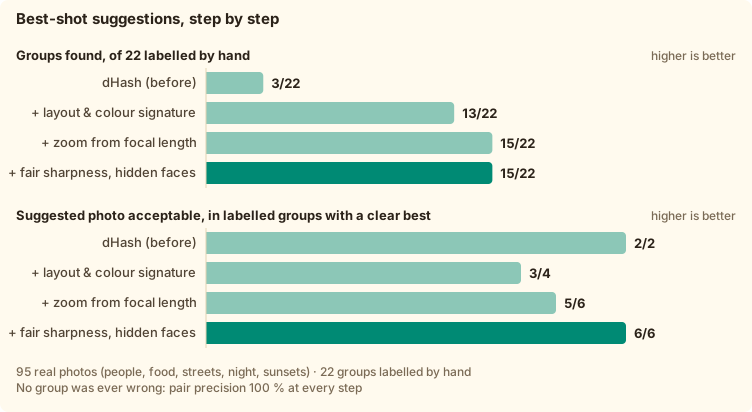
Bursts and re-framings are grouped, and the sharpest, steadiest shot with open eyes is suggested, with the reasons.
Every photo is cropped to the print size with live DPI. Rotate a quarter turn or straighten a horizon by up to 15°.
Full resolution, the colour profile kept, 4:4:4 JPEG. What comes out looks like what went in.
No account, no upload, no telemetry. Place names come from a map bundled in the app, and GPS is removed on export.
Fotollection is built to work with no internet at all. Nothing is uploaded, nothing is tracked, and you can check every line of it.
Photos are read and written on your own disk. There is no server to send them to.
No sign-up, and the app has no analytics or telemetry. It never goes online by itself, not even to check for updates.
Town names come from a map database bundled inside the app, so your GPS never reaches a third party.
Exported prints have their location stripped by default, so a photo handed to a print lab does not reveal where you live.
The code is public under GPL-3.0. Anyone can read it, build it and confirm that it does what this page says.

The orange LED date of an old film camera, with the town on the same line and your own words below. Set per photo or for all.
Date stamp with the town from the photo's GPS

A clean "Shot on" border with the camera's logo, lens, focal length, aperture, shutter and ISO, straight from EXIF.
The "Shot on" info frame with the camera's logo

Every photo is cropped to the print size with live DPI. Rotate a quarter turn or straighten a horizon by up to 15°.
Straightening a horizon in the crop editor

Bursts and re-framings are grouped, and the sharpest, steadiest shot with open eyes is suggested, with the reasons.
Similar shots grouped, the best one suggested
The photo services at dm and Rossmann are made by CEWE. Fotollection has every size of their price list built in, so the crop you see is exactly what comes out of the printer, with no surprise trimming at the edges.
Standard
Square
Strip
Your own ratio (no crop) and any custom size, in cm or inches
Fotollection is independent and not affiliated with CEWE, dm or Rossmann; their names and logos are trademarks of their owners, shown only to say where the prints can be made. Sizes checked against dm's price list in October 2026.
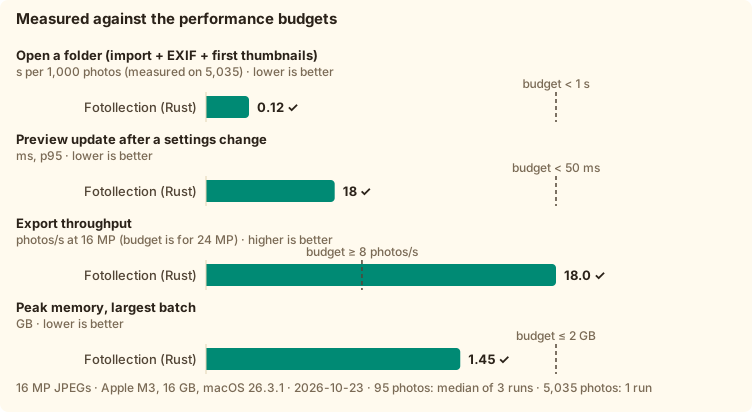
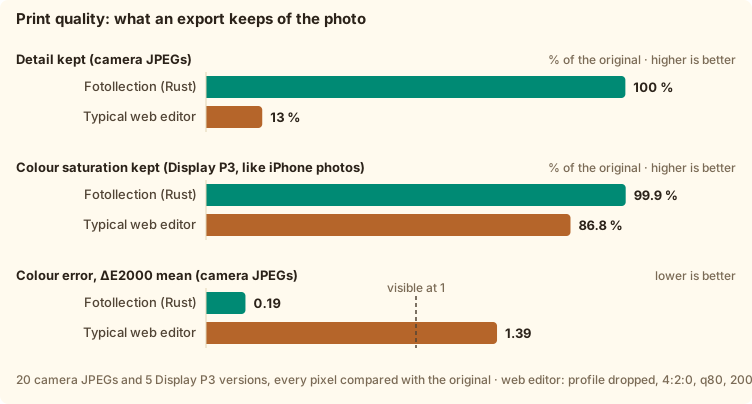
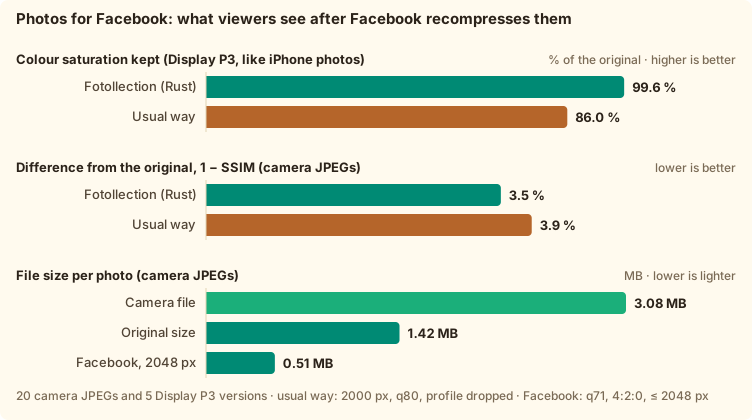
Measured pixel by pixel on real photos, against the export of a typical web editor.
Every number comes from real photos on an ordinary laptop (Apple M3, 16 GB), and the scripts are in the repository.
Every change, newest first. "Unreleased" is what the next version will bring.
Latest release: v0.4.0 · 2026-10-25
hoangphi01.github.io/fotollection/ links redirect to it.Noritsu logo (FR-040): the info frame shows the Noritsu logo for film scans whose EXIF make is “NORITSU KOKI” (EZ Controller), from a public-domain file on Wikimedia Commons like the other bundled logos (ADR-0020).
Share folder, apart from prints. The choice is remembered (settings v8).pyproject.toml and uv.lock pin their packages, and uv run runs them.ShutterSpeedValue), as some edited photos do.30mm F1.4 DC DN | Contemporary 016) no longer runs into the camera logo. The lens moves to its own line above the exposure settings, and a line that is still too long is set smaller.docs/DOCS_GUIDE.md, one checklist of what to update for each kind of change, including the website; CLAUDE.md and the docs index point to it.measure_folder --analyze measures it.[ and ] in the grid and the preview. Lossless, the crop turns with the photo, undoable, and kept in the project (project schema v4). Upside-down selfies are fixed in one key press.bench/quality/audit.py compares every exported pixel with the original. The export keeps the colour profile, full detail and saturation, with a mean ΔE2000 of 0.19, against a typical web-editor export that loses 87 % of the fine detail and 13 % of a P3 photo’s saturation. Shown in both READMEs and in RESULT §9.'25 09 21 DEBRECEN, offline; city, city + country code, or city + country), and type a line under the date that runs across the photo in plain capitals. The date sits a little higher, keeping the caption’s row free. The stamp’s font choice is gone (user fonts are for the info frame); settings move to v5..docx (FR-023): File → Save / Save As / Open / New (Cmd/Ctrl+S, Shift+Cmd/Ctrl+S, Cmd/Ctrl+O, Cmd/Ctrl+N), also in the sidebar. A .fotollection file carries the edits, print settings, info frame, camera profiles and the fonts and logos it uses, so it opens the same on another machine. Copying the project together with its photos keeps working; moved folders can be relinked. The window title shows unsaved changes, New and Open ask before discarding them, and double-clicking a .fotollection file opens it. The menu and title follow the interface language.10 × 13,3 cm).The info-frame controls (on/off, crop or fit, colour, date format, font, shown items) are now also in the preview, so the frame can be tuned without leaving it.
README.vi.md, the VI link at the top) and a reworked Performance section: four charts, each with a reference line (budget, 2 GB ceiling, browser) and a table under it. Charts are generated in English and Vietnamese by bench/chart.mjs; bench/batch.sh reproduces the 5,000-photo memory check.scripts/small-icons.py regenerates them.docs/RESULT.md: the latest measured speed and memory in one page, including a 5,035-photo batch (peak 1.47 GB, flat versus 95 photos). measure_folder gains --inflight N, --discard-output, per-phase RSS and a preview time breakdown.0–5, P, X and U in the grid or the preview, or click the stars and flags in the preview. Filter the library by flag and minimum rating; export writes exactly the filtered photos. Rejected photos are dimmed, never deleted, and every change is undoable.docs/EXTENSION.md: registry of Fotollection’s file types (project, preset, settings, fonts, logos, exports, inputs) with MIME types, UTIs, versions, limits and compatibility rules.bench/run.sh <photo-folder> measures export, preview and peak memory for the Rust core and for headless Chromium on the same photos, then draws docs/images/bench.svg for the README. Measured: export is a tie, the browser previews faster, and Rust uses 20% less memory and encodes 4:4:4.10 × 15 cm · 2:3, 4 × 6 in · 2:3).settings.json schema v2 with automatic migration from v1.settings.json, the first persisted file: render, frame and camera profiles, versioned and written atomically (DATABASE.md §6).YYYY-MM-DD/ folders, with progress and cancel, never overwriting files and never writing GPS.JpegCodec trait with pure-Rust codecs (ADR-0012), render plan, T0/T1 thumbnail cache, T2 preview LRU, bounded parallel export.task-progress event).library-changed, thumb-ready, export-progress, export-finished) and the fotothumb:// image protocol.fotollection-core + the Tauri 2 shell), and a React + Tailwind + shadcn/ui + Lucide UI shell (library sidebar, empty state, print-settings panel) with typed IPC through tauri-specta.cargo deny, npm audit and DOM-API security gates.scripts/bootstrap.sh / bootstrap.ps1, pinned Rust toolchain and Node version, committed lockfiles.LICENSE: GPL-3.0-only (ADR-0008). Distribution policy: unsigned builds with checksums (ADR-0009).docs/DEVELOPMENT.md and scripts/clean.sh, a tiered cleanup of build artifacts (sweep, release, full, deep).scripts/check-docs.sh).scripts/release.sh prepares a release commit; when it reaches main, CI builds the macOS (universal) and Windows installers and publishes them on GitHub Releases with checksums and first-launch steps. There is no in-app updater: the app stays fully offline and shows its version in the settings panel (FR-021)./vi/ (Vietnamese), with download buttons for the latest release, screenshots of the real app on CC0 demo photos, three benchmark charts, link previews, self-hosted fonts, and Google Analytics as the only third-party script (the website only; the app has none). Its colours come from the logo: a cream background, teal, wood and leaf green.docs/DATABASE.md: the single source of truth for persisted data, with a normalized (3NF) data model (integer keys, one fact in one place, sparse delta rows, no derived data on disk), columnar in-memory layout (~42 B per photo), project-file schema v1, migrations, atomic writes, the preset model, the thumbnail cache, and criteria for adopting SQLite..fotopreset sharing) and FR-039 (Photo Style looks modelled on Lumix GX9, including a built-in “C200 Natural”). ADR-0011 sets the scope boundary (global looks only).PLAN.md. Its content was split into docs/PRD.md, docs/ARCHITECTURE.md and docs/ROADMAP.md.Trial run of the release pipeline (macOS .dmg and Windows -setup.exe). Everything in it is released as 0.1.0.
The installers are not signed with a paid certificate yet, so the first launch needs one extra click.
Every release lists SHA-256 checksums next to the downloads. There is no auto-update, so the app never goes online. New versions are announced here and on GitHub.

Fotollection is made by a Vietnamese student in the EU, between classes and a part-time job. It's free and open source; if it saved you an evening of sorting photos, a coffee (or a student lunch 😄) keeps it going.
This VietQR code works only with banking apps in Vietnam (Napas 247). A way to support from abroad is coming soon.