Miễn phí · Mã nguồn mở · Không cần tài khoản Riêng tư — ảnh không bao giờ rời khỏi máy của bạn

Chụp hàng nghìn ảnh, chỉ xem lại khi ngồi trên máy bay?

Không có internet, và vẫn chưa biết giữ tấm nào. Hãy thử một lần nhìn lại cùng Fotollection — tự tìm ảnh đẹp nhất, in ngày chụp và chuẩn bị sẵn để in. Tự động, miễn phí và hoàn toàn offline.

Phiên bản mới nhất: v0.4.0 · macOS 11+ (Apple Silicon và Intel) · Windows 10/11

Thư viện ảnh, đã chấm sao và chọn ảnh

Đủ mọi thứ cho một lần in ảnh

Làm cho buổi tối sau chuyến đi, khi vài trăm tấm ảnh cần trở thành một xấp ảnh in nhỏ.

Dấu ngày kiểu máy film

Dòng ngày LED màu cam của máy film ngày xưa, tên nơi chụp cùng dòng và một dòng chữ của bạn bên dưới. Đặt riêng từng ảnh hoặc cho tất cả.

Khung thông tin máy ảnh

Viền "Shot on" gọn gàng với logo hãng, ống kính, tiêu cự, khẩu độ, tốc độ và ISO, lấy thẳng từ EXIF.

Gợi ý ảnh đẹp nhất

Ảnh chụp liên tiếp và các khung hình gần giống nhau được gom nhóm; app gợi ý tấm nét nhất, ít rung, không nhắm mắt, kèm lý do.

Cắt vừa khổ in

Mỗi ảnh được cắt đúng khổ in, hiện DPI ngay khi kéo. Xoay ¼ vòng hoặc cân lại đường chân trời tới 15°.

Giữ nguyên chất lượng gốc

Đủ độ phân giải, giữ hồ sơ màu, JPEG 4:4:4. Ảnh in ra giống ảnh bạn đã chụp.

Riêng tư và offline

Không tài khoản, không tải lên, không theo dõi. Tên địa điểm lấy từ bản đồ có sẵn trong app, GPS được xóa khi xuất.

Ảnh của bạn là của bạn

Fotollection được làm để chạy hoàn toàn không cần internet. Không tải lên, không theo dõi, và bạn có thể tự kiểm tra từng dòng code.

  • Không tải lên, không cloud

    Ảnh được đọc và ghi ngay trên ổ đĩa của bạn. Không có máy chủ nào để gửi ảnh tới.

  • Không tài khoản, không theo dõi

    Không cần đăng ký, và app không có analytics hay telemetry. App không bao giờ tự lên mạng, kể cả để kiểm tra cập nhật.

  • Địa điểm không cần dịch vụ bản đồ

    Tên nơi chụp lấy từ cơ sở dữ liệu bản đồ có sẵn trong app, nên GPS của bạn không đến tay bên thứ ba nào.

  • Xóa GPS khi xuất ảnh

    Ảnh xuất ra mặc định được xóa vị trí, nên ảnh gửi tiệm in không để lộ nơi bạn sống.

  • Mã nguồn mở

    Code công khai theo giấy phép GPL-3.0. Ai cũng có thể đọc, tự build và kiểm chứng app làm đúng như trang này nói.

Dấu ngày kèm tên nơi chụp từ GPS của ảnh

Dấu ngày kiểu máy film

Dòng ngày LED màu cam của máy film ngày xưa, tên nơi chụp cùng dòng và một dòng chữ của bạn bên dưới. Đặt riêng từng ảnh hoặc cho tất cả.

Dấu ngày kèm tên nơi chụp từ GPS của ảnh

Khung

Khung thông tin máy ảnh

Viền "Shot on" gọn gàng với logo hãng, ống kính, tiêu cự, khẩu độ, tốc độ và ISO, lấy thẳng từ EXIF.

Khung "Shot on" với logo của hãng máy ảnh

Cân lại đường chân trời trong màn cắt ảnh

Cắt vừa khổ in

Mỗi ảnh được cắt đúng khổ in, hiện DPI ngay khi kéo. Xoay ¼ vòng hoặc cân lại đường chân trời tới 15°.

Cân lại đường chân trời trong màn cắt ảnh

Ảnh giống nhau được gom nhóm, gợi ý tấm đẹp nhất

Gợi ý ảnh đẹp nhất

Ảnh chụp liên tiếp và các khung hình gần giống nhau được gom nhóm; app gợi ý tấm nét nhất, ít rung, không nhắm mắt, kèm lý do.

Ảnh giống nhau được gom nhóm, gợi ý tấm đẹp nhất

Sẵn sàng cho máy in ảnh ở và 

Dịch vụ in ảnh của dm và Rossmann đều do CEWE thực hiện. Fotollection có sẵn mọi khổ trong bảng giá của họ, nên khung cắt bạn thấy chính là ảnh máy in trả ra, không bị xén mép bất ngờ.

Tiêu chuẩn

  • 9 × 13
  • 10 × 15
  • 13 × 18
  • 15 × 20
  • 20 × 30

Vuông

  • 10 × 10
  • 13 × 13
  • 15 × 15
  • 20 × 20

Dải dài

  • 5 × 15

Giữ tỉ lệ gốc (không cắt) và mọi khổ tùy chỉnh, theo cm hoặc inch

Từ chuyến đi đến xấp ảnh in

  1. Chọn ảnh đẹp nhất và chọn khổ in.
  2. Xuất ra một thư mục, USB hoặc thẻ SD.
  3. In ngay tại máy trong cửa hàng, hoặc tải lên dịch vụ in online của cửa hàng.

Fotollection là dự án độc lập, không liên kết với CEWE, dm hay Rossmann; tên và logo là thương hiệu của chủ sở hữu, chỉ dùng để cho biết có thể in ảnh ở đâu. Khổ in được đối chiếu với bảng giá của dm vào tháng 10/2026.

Ảnh in giống hệt ảnh gốc

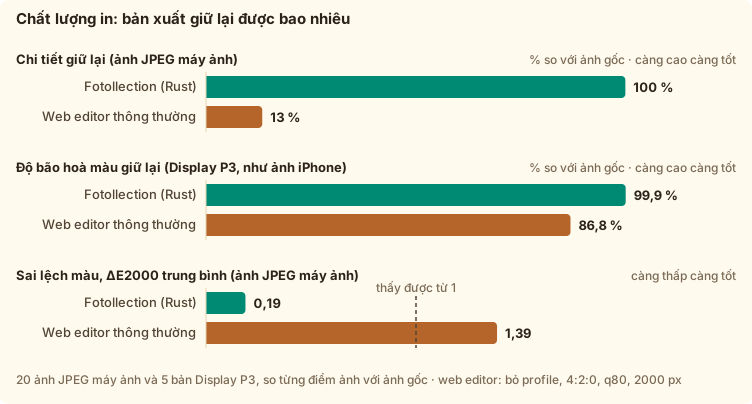
Đo từng điểm ảnh trên ảnh thật, so với bản xuất của một trình sửa ảnh trên web thông thường.

0,19sai lệch màu trung bình (ΔE2000). Dưới 1 thì mắt không phân biệt được.
100 %chi tiết nhỏ được giữ lại. Trình sửa ảnh web thông thường chỉ giữ 13 %.
0 bytegửi đi bất kỳ đâu. App chạy không cần mạng.

Cách đo

Đo thật, không hứa suông

Mọi con số đều đo trên ảnh thật, bằng một chiếc laptop bình thường (Apple M3, 16 GB); script đo nằm ngay trong repo.
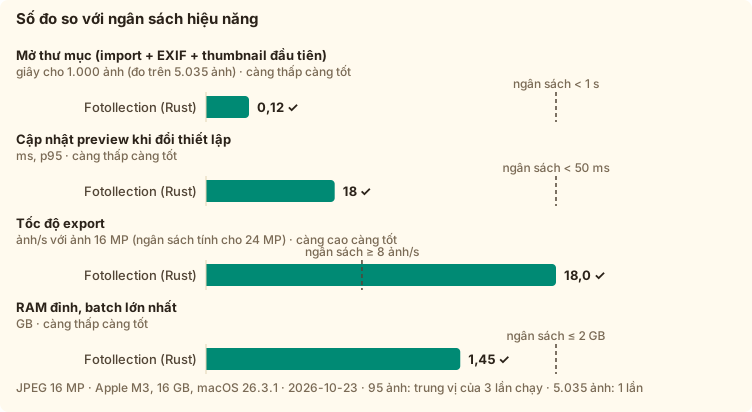
Tốc độ và bộ nhớ, so với ngân sách đặt ra trước khi viết code
Bản xuất giữ lại được bao nhiêu so với ảnh gốc, so với một trình sửa ảnh web thông thường
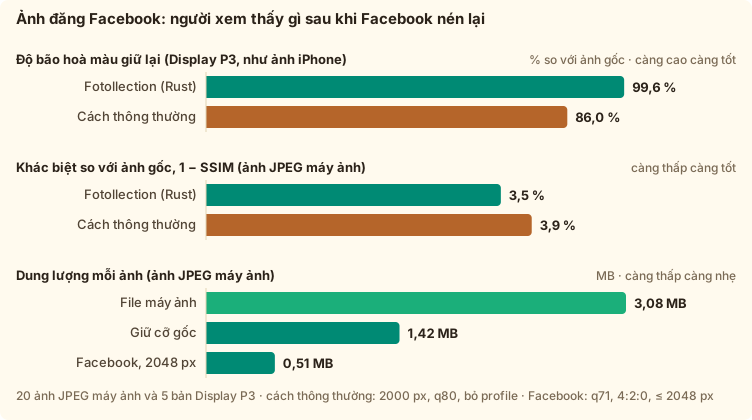
Ảnh đăng Facebook: người xem thấy gì sau khi Facebook nén lại
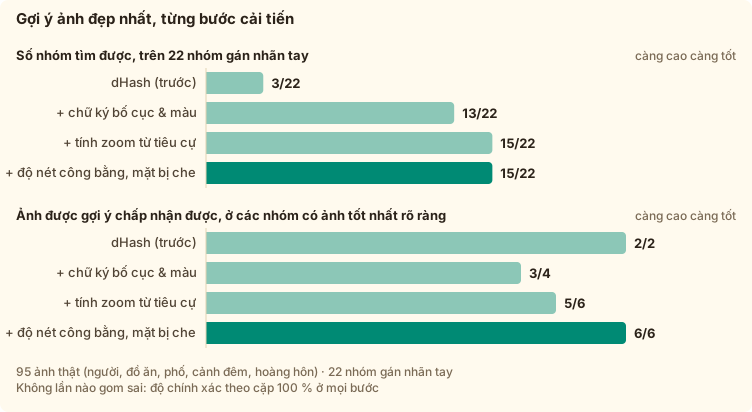
Gợi ý ảnh đẹp nhất, chấm điểm so với ảnh do người chọn tay

Xem toàn bộ số đo và giải thích

Có gì mới

Mọi thay đổi, mới nhất ở trên cùng (viết bằng tiếng Anh). "Unreleased" là những gì bản tiếp theo sẽ có.

Bản phát hành mới nhất: v0.4.0 · 2026-10-25

[Unreleased]

Changed

  • Website: the site moves to its own address, https://fotollection.org/; the old hoangphi01.github.io/fotollection/ links redirect to it.

[0.4.0] - 2026-10-25

Highlights

  • New: export for social media (original size, Facebook, Instagram or your own size), in sRGB, with the camera details and never GPS
  • New: folders work like tabs, and several folders export together or separately
  • New: export the photo you are looking at, straight from the preview, and zoom with a trackpad pinch or Ctrl/⌘ + −
  • New: drag the photo to reframe it; Fit whole photo frames it like an instax print
  • New: the Noritsu logo for film scans, and a Performance page on the website
  • Fixes: long lens names no longer cover the logo, photos without EXIF get the file’s date, Vietnamese wording

Added

  • Noritsu logo (FR-040): the info frame shows the Noritsu logo for film scans whose EXIF make is “NORITSU KOKI” (EZ Controller), from a public-domain file on Wikimedia Commons like the other bundled logos (ADR-0020).

  • Share online (FR-053): the print size card, now Print / export size, has Print and Share online, so the export card only exports. Share makes light JPEGs in sRGB at the original size (about half the file, measured on compact-camera JPEGs), 2048 px for Facebook, 1080 px wide for Instagram (portraits stop at 3:4) or a long edge of your choice (640–6000 px). Photos in Display P3 or Adobe RGB are converted so they do not look washed out, and they are lightly sharpened after resizing. The files keep the camera, lens and exposure details and name Fotollection as the editing app, like Snapseed; the location is never written. They go into a Share folder, apart from prints. The choice is remembered (settings v8).
  • Export from the preview (FR-055): the preview has an Export card, with the same controls as the settings panel, that exports only the photo you are looking at; the Export button on the photo jumps to it. Both places share the destination and the progress.
  • Folders as tabs (FR-056): the library list starts with All photos; clicking a folder shows only that folder (grid, best-shot groups and export), like switching browser tabs. The select button above the list, or Ctrl/⌘-click, ticks several folders. When an export covers two folders or more, choose Together (the usual date folders) or Separately (one subfolder per folder). Folder counts no longer change with the star and flag filter.
  • Zoom in the preview (FR-057): pinch on the trackpad or press Ctrl/⌘ + and − to zoom about the pointer (up to 800 %), Ctrl/⌘ 0 to fit; drag or scroll with two fingers to move around, double-click for 200 %. The zoom level shows next to the photo counter; click it to go back to fit.
  • Website: the page’s scroll bar is thin and in the theme colour, like the changelog box’s.
  • Website: a new Performance page gathers every measurement with its chart and explains the words behind them (ΔE, SSIM, JPEG colour depth, JPG or PNG, 4:4:4, colour profiles, DPI, why Facebook makes photos worse); the home page links to it.
  • Vietnamese: the interface and the website say cắt ảnh, xuất ảnh and xem trước instead of the English crop, export and preview.
  • App: scroll bars are thin and in the theme colour, like the website’s; the language picker is narrower, so its label is never cut.
  • Website: the print-shop heading shows the dm and Rossmann logos inline, in the theme colour (public-domain files from Wikimedia Commons; trademarks of their owners).
  • Development: the Python tools (quality audits, icon and screenshot helpers) are managed with uv: pyproject.toml and uv.lock pin their packages, and uv run runs them.
  • Drag to reframe (FR-006): in the preview, drag the photo to choose what the print keeps, without opening the crop editor; the print re-renders as you drag, and one drag is one undo step.
  • Fit whole photo (FR-040): like an instax print, the whole photo keeps the print size and gets a 5 mm border on three sides plus the info bar below, so the print is larger than the chosen size (10 × 15 → about 11 × 17.9 cm); the print-size card says how large. Before, the photo shrank inside the box. Crop to fill still keeps the exact size.

Fixed

  • Photos without EXIF (FR-004): the date stamp uses the file’s date, as the preview said it would; a photo with no date at all still prints its place and caption.
  • Info frame (FR-040): the shutter speed shows for files that store it only as an APEX value (ShutterSpeedValue), as some edited photos do.
  • Preview: a new setting or a drag no longer blanks the photo while the next render loads.
  • Website: the back-to-top button works on iPhone (Safari jumped only a little).
  • Website: the changelog box shows its “click to scroll” hint again, and its thin scroll bar now applies in Firefox too.
  • Hover hints near the window’s edge are no longer cut off.
  • Info frame (FR-040): a long lens name (for example 30mm F1.4 DC DN | Contemporary 016) no longer runs into the camera logo. The lens moves to its own line above the exposure settings, and a line that is still too long is set smaller.

[0.3.1] - 2026-10-25

Highlights

  • New: click the version to see what each release brought
  • UI update: the toolbar stays on one line, photo filters as dropdowns, larger sidebar icons
  • Fixes: a minimum window width so the layout never breaks

Added

  • Version history: clicking the version at the foot of the settings panel opens a short list of every release with two lines on what it brought, read from the bundled CHANGELOG (no network).

Fixed

  • The toolbar above the photos stays on one line: the photo filters are two dropdowns, and the window can no longer be made narrower than 1,180 px.
  • The project and library buttons in the sidebar are larger (16 px icons, as STYLE_RULE asks).

[0.3.0] - 2026-10-25

Highlights

  • New: a logo size slider for the info frame, the same for every photo
  • UI update: settings sections as cards, lines in the theme colour, aligned headers
  • Fixes: arrow keys with the logo slider, date buttons overflowing, the same fonts on Windows as on macOS
  • Website: coffee and download buttons beside the GitHub star

Added

  • Website: a coffee button next to the GitHub star, a round Download button in the menu; “What’s new” moved out of the menu (it stays in the footer).
  • Logo size (FR-040): a slider under the logo colours in the info frame settings scales the camera logo, from 50 % to 200 %, for every photo in the project.

Changed

  • Lines in the theme colour: borders are a pale teal in light mode and a pale wood in dark mode; section cards have a slightly stronger 1.5 px outline.
  • Sections as cards: every settings section, in the settings panel and the preview, is a card with a tinted header holding its icon, title and master switch, so sections read apart at a glance.

Fixed

  • Dates and numbers in the interface use the bundled Geist Mono, so Windows shows them exactly like macOS (the rest of the interface already used the bundled Geist).
  • With the logo size slider focused, ← → changed the photo as well as the size; now the slider keeps the keys, and clicking the photo hands them back to browsing.
  • The date formats no longer overflow their buttons.
  • The toolbar above the photos is now exactly as tall as the library and settings headers, so the three header lines line up.

[0.2.0] - 2026-10-24

Highlights

  • New: System / Light / Dark theme switch
  • New: Windows title bar in the app’s colours, like VS Code
  • New: remove a folder from the library, like closing a tab
  • UI update: one accent per mode (teal light, wood dark), app-drawn hints, print badges in the preview
  • Fixes: the best-shot highlight was clipped

Added

  • Theme switch (FR-052): System, Light or Dark, at the foot of the library column; the window follows it.
  • Windows title bar (FR-052): drawn in the app’s colours like VS Code’s, instead of the white system strip.
  • Remove a folder (FR-001): a close button on each folder, like a browser tab; the files stay on disk.
  • Website: a “buy me a coffee” section with a VietQR code (Vietnamese banking apps only), a note on who makes Fotollection, a footer button to the author’s blog, and larger screenshots in alternating rows, each beside its explanation (the best-shot one now shows the compare view).
  • The preview shows the same Sharp / Acceptable / Pixelated badges and size advice as the settings panel (FR-026), and dialogs close with a small red button.
  • Website, “What’s new”: the changelog in a scrollable box, with the latest release.
  • The date stamp in the preview now has the same fields as the settings panel, including corner and colour, and comes before the info frame.

Changed

  • Docs: docs/DOCS_GUIDE.md, one checklist of what to update for each kind of change, including the website; CLAUDE.md and the docs index point to it.
  • One accent per mode: light mode uses the logo’s teal and dark mode its wood for every button, switch, checkbox and selection, never both at once (the website too).
  • Hover hints are drawn in the app’s own style instead of the system’s square tooltips.

Fixed

  • The theme switch now shows which theme is selected.
  • The highlight around the suggested best shot was clipped in the compare view and the groups strip.

[0.1.0] - 2026-10-24

Highlights

  • First public preview for macOS and Windows
  • Best-shot suggestions, film-style date stamp with offline place names, camera info frame
  • Crop to print sizes with rotate and straighten, original-quality export
  • English and Vietnamese

Added

  • Best-shot suggestions (FR-041): Find best shots groups bursts and re-framings of one moment, then suggests the best photo of each group with up to three reasons (“34 % sharper”, “Eyes open”, “Less camera shake”). The Groups view shows each group as a strip, best first; Compare puts the shots side by side with a bar per measure and marks closed eyes. Keep best picks the suggestion and rejects the rest, for one group or all clear groups at once; for groups marked “Too close to call”, choose with Keep this one. Nothing is deleted and everything is undoable. It runs offline on bundled face models, in about 17 ms per photo (28 ms with faces); results are cached, so a second run is instant. measure_folder --analyze measures it.
  • Refresh folders (FR-001): a button next to the library’s folders picks up photos added to them since, without re-importing; ratings, flags, crops and stamps are kept.
  • Rotate photos (FR-006): turn a photo left or right with the buttons next to Crop in the preview, or with [ and ] in the grid and the preview. Lossless, the crop turns with the photo, undoable, and kept in the project (project schema v4). Upside-down selfies are fixed in one key press.
  • Straighten (FR-006): a slider in the crop editor levels a tilted horizon by up to ±15°, with a fine grid while you drag; in crop mode ← → level by 1° (⌥ for 0.1°), and move between photos again once you leave it. The crop stays as large as possible without empty corners, and only the cropped pixels are resampled. Undoable, kept in the project (project schema v5).
  • Print-quality audit (NFR-009): bench/quality/audit.py compares every exported pixel with the original. The export keeps the colour profile, full detail and saturation, with a mean ΔE2000 of 0.19, against a typical web-editor export that loses 87 % of the fine detail and 13 % of a P3 photo’s saturation. Shown in both READMEs and in RESULT §9.
  • The line under the date updates the preview while you type (a short pause after the last key), in the settings panel and in the preview.
  • A photo’s own date stamp (FR-044): in the preview, the stamp controls (on/off, format, place, the line under the date) now change the open photo only, marked This photo; Apply to all makes them the setting for every photo. The settings panel offers Reset for photos with their own stamp. Undoable, and saved in the project (project schema v3).
  • Film-camera style imprint (FR-004, FR-005, FR-033, FR-036): the text inside the photo is now a slanted 14-segment LCD face (DSEG14 Italic, OFL) with the soft glow of an LED date imprint. Switch on Place on the date line to add the town from the photo’s GPS ('25 09 21 DEBRECEN, offline; city, city + country code, or city + country), and type a line under the date that runs across the photo in plain capitals. The date sits a little higher, keeping the caption’s row free. The stamp’s font choice is gone (user fonts are for the info frame); settings move to v5.
  • Fixed: the accent-folding table was misaligned, so some accented letters searched or printed as the wrong letter (for example “đ” as “c”).
  • Camera-brand logos in the info frame (FR-040): Apple, Canon, Fujifilm, Hasselblad, Leica, Lumix, Nikon, Phase One, Ricoh, Samsung and Sony logos come with the app (public-domain renderings from Wikimedia Commons; trademarks of their owners) and are picked from the EXIF make. Choose Classic (black wordmarks, colour accents kept), Brand colours or One colour; on a black frame, dark parts turn white. Wordmarks are sized to the frame text. Cameras still on the default typeset name switch to their logo once (settings v4); your own PNG and typed names are kept.
  • Switching off the date stamp or the info frame now folds its options away, so the settings panel and the preview stay short.
  • README (English and Vietnamese): system requirements for running and building, with measured memory and cache sizes.
  • Rename a project in place (FR-023): double-click its name in the sidebar. A saved project’s file is renamed in its folder (never over another file); an untitled project uses the name for its first Save. Enter saves, Esc cancels.
  • The sidebar, now a little wider, and the README credit the author: “Fotollection by @hoangphi01”.
  • Better best-shot groups (FR-041): similar shots are now matched by layout and colour instead of a dHash, and re-shooting closer (zooming) no longer splits a group. On 95 hand-labelled photos the app now finds 15 of 22 groups instead of 3, still with no wrong group, and its suggestion was acceptable in all 6 groups with a clear best. A shot with the face turned away no longer wins on background sharpness. Analyses are recomputed once (cache version 2). The README shows the full evaluation.
  • The library toolbar adapts to the space between the sidebars: button labels shrink to icons first, then the filters wrap to a second row, so nothing is cut off on smaller windows.
  • HEIC import (FR-001): iPhone photos (HEIC/HEIF) open, preview and export like JPEG, with their EXIF date and GPS. They are decoded by the operating system (ImageIO on macOS; on Windows, the HEIF and HEVC extensions from the Microsoft Store). Without the Windows extensions, the skipped-files list says what to install.
  • Project files like .docx (FR-023): File → Save / Save As / Open / New (Cmd/Ctrl+S, Shift+Cmd/Ctrl+S, Cmd/Ctrl+O, Cmd/Ctrl+N), also in the sidebar. A .fotollection file carries the edits, print settings, info frame, camera profiles and the fonts and logos it uses, so it opens the same on another machine. Copying the project together with its photos keeps working; moved folders can be relinked. The window title shows unsaved changes, New and Open ask before discarding them, and double-clicking a .fotollection file opens it. The menu and title follow the interface language.
  • Vietnamese interface (FR-020): choose English or Tiếng Việt at the top of the settings panel; it applies at once and is remembered. Every label, hint and error message is translated, and numbers use the language’s decimal separator (10 × 13,3 cm).
  • The info-frame controls (on/off, crop or fit, colour, date format, font, shown items) are now also in the preview, so the frame can be tuned without leaving it.

  • README in Vietnamese (README.vi.md, the VI link at the top) and a reworked Performance section: four charts, each with a reference line (budget, 2 GB ceiling, browser) and a table under it. Charts are generated in English and Vietnamese by bench/chart.mjs; bench/batch.sh reproduces the 5,000-photo memory check.
  • Simplified logo tile (no wordmark) for the sidebar, favicon and every app-icon size up to 64 px, so the icon stays readable in the menu bar, taskbar and Finder lists. scripts/small-icons.py regenerates them.
  • docs/RESULT.md: the latest measured speed and memory in one page, including a 5,035-photo batch (peak 1.47 GB, flat versus 95 photos). measure_folder gains --inflight N, --discard-output, per-phase RSS and a preview time breakdown.
  • Original print size (FR-045): keep each photo’s own aspect ratio with no crop (10 cm on the short edge, e.g. 10 × 13.3 cm for 4:3). Works with the date stamp, the info frame and the DPI check.
  • Culling (FR-022): rate photos 0–5 stars and flag them pick/reject with 0–5, P, X and U in the grid or the preview, or click the stars and flags in the preview. Filter the library by flag and minimum rating; export writes exactly the filtered photos. Rejected photos are dimmed, never deleted, and every change is undoable.
  • PNG import (FR-001): PNG photos and screenshots (8/16-bit, greyscale, palette) open, preview and export like JPEG. Transparency prints as white, and an embedded ICC profile is kept.
  • docs/EXTENSION.md: registry of Fotollection’s file types (project, preset, settings, fonts, logos, exports, inputs) with MIME types, UTIs, versions, limits and compatibility rules.
  • Rust vs browser benchmark: bench/run.sh <photo-folder> measures export, preview and peak memory for the Rust core and for headless Chromium on the same photos, then draws docs/images/bench.svg for the README. Measured: export is a tie, the browser previews faster, and Rust uses 20% less memory and encodes 4:4:4.
  • Crop editor: dims everything outside the crop, drag to move, wheel/pinch/slider zoom, arrow-key nudge, and a live label with the printed size in cm, pixel size and DPI band. Crops are stored as centre + zoom, so they survive print-size changes.
  • Session project (FR-023): edits autosave atomically to an implicit project. The last session’s folders are re-scanned and edits restored at launch. Undo/redo with Cmd/Ctrl+Z.
  • Custom fonts (FR-042): import OTF/TTF, then choose them for the date stamp and the info frame. Files are validated and copied; removing a font falls back to Inter.
  • Custom print sizes (FR-043): enter in cm or inches (e.g. 4 × 6 in), saved and usable everywhere.
  • Crop editor edge labels (width on top, height on the left, in cm or in) and an aspect-ratio pill.
  • The print-size picker shows each size’s aspect ratio (10 × 15 cm · 2:3, 4 × 6 in · 2:3).
  • settings.json schema v2 with automatic migration from v1.
  • Info frame (“Shot on …”, FR-040):
    • A white or black bar with the brand, camera, lens, focal length, aperture, shutter, ISO, photo style and date.
    • The whole print keeps the selected size, with the photo cropped to fill or fitted whole.
    • Every item can be switched on or off, LUMIX Lab style.
    • Per-camera overrides for manual lenses, names and styles, remembered across sessions.
    • Optional user PNG logo per camera (ADR-0014).
  • settings.json, the first persisted file: render, frame and camera profiles, versioned and written atomically (DATABASE.md §6).
  • EXIF now reads the lens, focal length, aperture, shutter and ISO.
  • First working slice (JPEG):
    • Open a folder (or drop it on the window) to get a virtualized thumbnail grid with instant EXIF thumbnails.
    • Preview the exact print: centred crop for 8 print sizes, and a date stamp (3 formats, 4 corners, white or retro orange) inside the safe area.
    • Export at full resolution to YYYY-MM-DD/ folders, with progress and cancel, never overwriting files and never writing GPS.
  • Rust core: import validation (magic bytes, size, polyglot), allowlisted EXIF, columnar library, JpegCodec trait with pure-Rust codecs (ADR-0012), render plan, T0/T1 thumbnail cache, T2 preview LRU, bounded parallel export.
  • Print preview dialog with an inspector: capture time and source, camera, pixel and file size, GPS, effective print DPI with a quality band (FR-026), crop mode, and quick stamp controls.
  • Loading feedback: skeleton and spinner thumbnails that fade in, plus a progress bar with percentage for reading photos and preparing thumbnails (task-progress event).
  • Typed IPC events (library-changed, thumb-ready, export-progress, export-finished) and the fotothumb:// image protocol.
  • Phase 0 scaffold: a Cargo workspace (fotollection-core + the Tauri 2 shell), and a React + Tailwind + shadcn/ui + Lucide UI shell (library sidebar, empty state, print-settings panel) with typed IPC through tauri-specta.
  • Retro app logo and generated platform icons.
  • CI: build, lint and test on macOS and Windows; stale-bindings check; cargo deny, npm audit and DOM-API security gates.
  • Reproducible machine setup: scripts/bootstrap.sh / bootstrap.ps1, pinned Rust toolchain and Node version, committed lockfiles.
  • Documentation framework: PRD, architecture, optimization, style rules, security, testing, release, roadmap, status, glossary, and ADRs 0001–0007.
  • LICENSE: GPL-3.0-only (ADR-0008). Distribution policy: unsigned builds with checksums (ADR-0009).
  • docs/DEVELOPMENT.md and scripts/clean.sh, a tiered cleanup of build artifacts (sweep, release, full, deep).
  • Docs CI: markdownlint, link check, and the requirement-ID consistency check (scripts/check-docs.sh).

Changed

  • Releases (ADR-0021): one version for the whole app, following Semantic Versioning (0.x until the MVP is complete). scripts/release.sh prepares a release commit; when it reaches main, CI builds the macOS (universal) and Windows installers and publishes them on GitHub Releases with checksums and first-launch steps. There is no in-app updater: the app stays fully offline and shows its version in the settings panel (FR-021).
  • A look from the logo: the app’s buttons, switches and checkboxes take the logo’s teal, the panels a faint cream (a warm brown in dark mode), and the selected photo sits in a wood-coloured frame. Surfaces next to photos stay near-neutral, and the preview stays on black, so colours are still judged correctly.
  • Square print sizes 10×10, 13×13 and 20×20 (FR-006): with them, every size on the price list of the CEWE photo service at dm and Rossmann is built in.
  • Print-size advice (FR-026): under the print-size picker, one sentence tells how large the selected photo prints sharp and still acceptable (“6240 × 4160 px (26 MP): sharp up to about 35 × 53 cm, acceptable up to 70 × 106 cm”), and every size in the list carries a badge: green Sharp, yellow Acceptable, red Pixelated.
  • Website, print shops: a section shows that the CEWE kiosk sizes of dm and Rossmann are built in, with the three steps from trip to prints (Fotollection is not affiliated with them).
  • Website: https://hoangphi01.github.io/fotollection/ (English) and /vi/ (Vietnamese), with download buttons for the latest release, screenshots of the real app on CC0 demo photos, three benchmark charts, link previews, self-hosted fonts, and Google Analytics as the only third-party script (the website only; the app has none). Its colours come from the logo: a cream background, teal, wood and leaf green.
  • The Vietnamese place-format buttons are shorter (“Thành phố”, “+ mã nước”, “+ tên nước”), so they no longer overflow the settings panel.
  • Previews are faster: 26 → 17 ms, now faster than the same work in Chromium. On-screen JPEGs (previews, thumbnails) use 4:2:0 and plain Huffman tables; exported prints keep 4:4:4 and optimized tables.
  • Thumbnails no longer wait behind background work: there are separate interactive and background pools, and the core is optimized in dev builds.
  • CSP now allows inline styles (scripts stay strict) so Radix overlays work in release builds (ADR-0013).
  • New docs/DATABASE.md: the single source of truth for persisted data, with a normalized (3NF) data model (integer keys, one fact in one place, sparse delta rows, no derived data on disk), columnar in-memory layout (~42 B per photo), project-file schema v1, migrations, atomic writes, the preset model, the thumbnail cache, and criteria for adopting SQLite.
  • PRD: FR-038 (Lightroom-style partial, stackable, linked print presets with .fotopreset sharing) and FR-039 (Photo Style looks modelled on Lumix GX9, including a built-in “C200 Natural”). ADR-0011 sets the scope boundary (global looks only).
  • PRD expanded with 16 requirements (FR-022…FR-037) covering culling, projects with undo, mixed print sizes, resolution warnings, sRGB conversion, safe area and borders, clock correction, GPS borrowing, manual date and place, a retro LED date stamp, lab presets, captions, multi-photo layouts, sharpening and contact sheets. Also NFR-012/013 and ADR-0010 (project file format).
  • Project renamed from PhotoOrder to Fotollection.
  • Direction changed from a browser web app to an offline Tauri 2 desktop app with a Rust core (ADR-0001).
  • UI stack changed to React, shadcn/ui and Lucide (ADR-0007).

Removed

  • PLAN.md. Its content was split into docs/PRD.md, docs/ARCHITECTURE.md and docs/ROADMAP.md.

[0.1.0-beta.1] - 2026-10-24

Trial run of the release pipeline (macOS .dmg and Windows -setup.exe). Everything in it is released as 0.1.0.

Changelog đầy đủ trên GitHub

Cài đặt trong một phút

Bộ cài chưa được ký bằng chứng chỉ trả phí, nên lần mở đầu tiên cần thêm một cú nhấp.

macOS

  1. Mở file .dmg và kéo Fotollection vào Applications.
  2. Mở app. macOS sẽ chặn lần mở đầu tiên.
  3. Vào System Settings → Privacy & Security, bấm Open Anyway.

Windows

  1. Chạy file -setup.exe (hoặc .msi).
  2. Nếu SmartScreen báo "Windows protected your PC", bấm More info.
  3. Bấm Run anyway.

Mỗi bản phát hành có mã SHA-256 bên cạnh file tải về. App không tự cập nhật, nên không bao giờ tự lên mạng. Phiên bản mới được thông báo ở đây và trên GitHub.

Mã VietQR ủng hộ cà phê, Techcombank, Phạm Hoàng Phi

☕ Ủng hộ một cốc cà phê

Fotollection do một du học sinh Việt ở châu Âu làm trong thời gian rảnh, giữa giờ học và giờ làm thêm. App miễn phí và mã nguồn mở; nếu nó giúp bạn đỡ được một buổi tối ngồi lọc ảnh, một cốc cà phê (hay một bữa cơm sinh viên 😄) sẽ giúp mình tiếp tục làm.

Mã VietQR này chỉ dùng được với app ngân hàng tại Việt Nam (Napas 247). Cách ủng hộ từ nước ngoài sẽ có sau.